
The JavaScript Event Loop: The Skill That Separates Juniors From Seniors
Promises, async/await, timers…everything in JavaScript relies on the event loop. Mastering it changes how you write and debug code.

Martin Ferret
January 21, 2026
The bug that “shouldn’t exist”
Every JavaScript developer has faced it.
The code looks correct.
The logic makes sense.
And yet… the output is wrong.
Most of the time, the culprit isn’t syntax or logic.
It’s timing, and that means the event loop.
A simple way to picture the event loop
Think of JavaScript like a focused human at a desk.
You take one task, you finish it, then you take the next. No multitasking.
When there’s nothing to do, you wait.
And when new tasks arrive, you handle them in order.
That’s the event loop:
- the call stack is what you’re doing right now
- the task queue is the “do this later” pile (timers, UI events, etc.)
- the microtask queue is the “do this as soon as you’re free” pile (Promises)
The key rule: when the stack becomes empty, JavaScript runs microtasks first, then regular tasks.
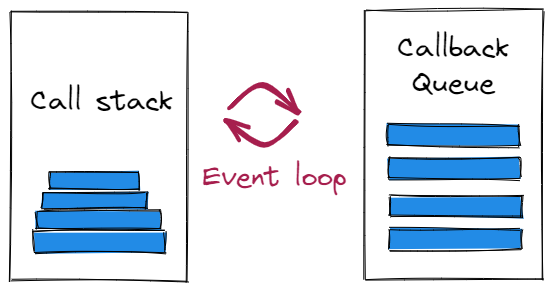
JavaScript doesn’t multitask
JavaScript executes one thing at a time. Always.
What makes it feel asynchronous is the coordination between:
- the call stack
- the task queue
- the microtask queue
If you don’t understand how these interact, you’re guessing, not programming.
Why setTimeout(fn, 0) isn’t immediate
console.log('A');
setTimeout(() => console.log('B'), 0);
console.log('C');
Output:
A
C
B
Because setTimeout schedules a task, it does not interrupt execution.
JavaScript finishes the current stack first.
Only then does it move to queued tasks.
Promises change the order of reality
Promises don’t use the task queue.
They use the microtask queue, which runs before regular tasks.
console.log('A');
Promise.resolve().then(() => console.log('B'));
setTimeout(() => console.log('C'), 0);
Output:
A
B
C
This single rule explains an enormous number of production bugs.
async/await is syntax sugar, not magic
async/await makes asynchronous code readable.
It does not change execution semantics.
An await:
- pauses the current function
- clears the call stack
- schedules continuation as a microtask
Understanding this prevents race conditions and phantom bugs.
Final thought
The event loop is invisible, until it breaks your application.
Senior JavaScript developers don’t memorize APIs.
They understand how time works in JavaScript.
Ready to prove your JavaScript skills?
Get certified in JavaScriptMore JavaScript articles
Keep learning JavaScript. Then get certified when you are ready.
Iterator Helpers: Lazy Pipelines in JavaScript
ES2025 added map, filter, take and drop to iterators. Learn how lazy pipelines skip intermediate arrays, handle infinite sequences, and where they do not help.
Martin Ferret
Oct 6, 2026
AbortController: Cancellation and Cleanup in JavaScript
AbortController does more than cancel a fetch. Learn how one signal cleans up event listeners, times out requests, and combines with AbortSignal.any().
Martin Ferret
Sep 22, 2026
Proxy and Reflect: Metaprogramming in JavaScript
Learn how JavaScript Proxy and Reflect intercept object operations: the 13 traps and why Reflect matters.
Martin Ferret
Sep 8, 2026