How to animate transitions with Angular?
Angular 20.2 introduces a delightfully simple way to animate elements as they enter and leave the screen. With zero imports and CSS doing all the heavy lifting, the new animate.enter and animate.leave attributes let you add smooth, modern transitions with minimal code and maximum sanity.

Alain Chautard
December 26, 2025
In Angular 20.2, CSS animations for transitions have evolved with a fairly simple API.
Let’s dive into it.
How to animate a new element entering the screen?
Here is an example of animation for an element entering the screen:
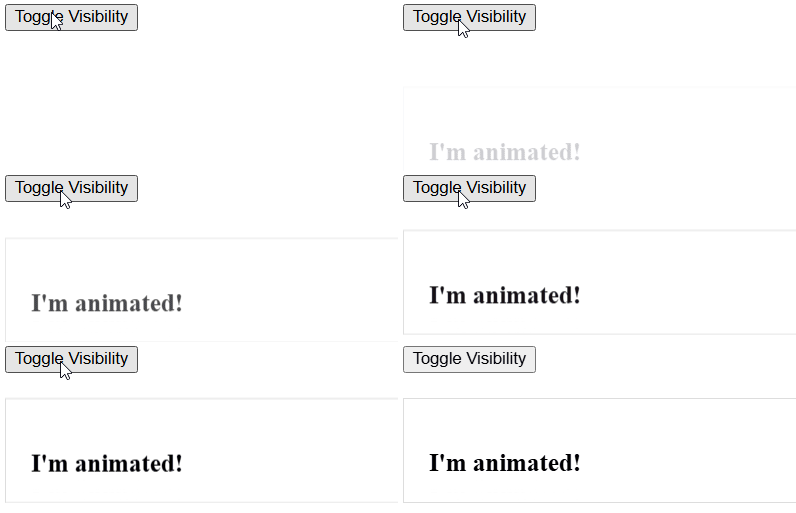
The first thing to know is that animations are 100% driven by CSS. If you’re not familiar with CSS animations, you can use the CSS animation generator mentioned in this post.
Note that AI tools can also assist you in generating proper CSS animations. In the case of the example above, I used the following CSS code:
.entering {
  animation: slide-fade 2s;
}

@keyframes slide-fade {
  from {
    opacity: 0;
    transform: translateY(30px);
  }
  to {
    opacity: 1;
    transform: translateY(0);
  }
The code is almost self-explanatory: We transition from an opacity of 0 (invisible) 30 pixels from the bottom to an opacity of 1 (fully visible) at the right position, and this animation lasts for 2 seconds.

Once the CSS class is ready, all that is left to do is tell Angular to use it. Here is how:
<div class="enter-container" animate.enter="entering">
        <p>I'm animated!</p>
</div>
That’s it! animate.enter is a specific attribute supported by the Angular compiler. It’s not a directive, which means no import needed. You can use it as-is.
How to animate a new element exiting the screen?
Another attribute called animate.leave can be added as well.
Let’s create another transition to use when hiding the element:
.leaving {
  opacity: 0;
  transform: translateX(20px);
  transition: opacity 500ms ease-out, transform 500ms ease-out;
}
This one moves to the side by 20 pixels and lasts 500 ms. We apply it by adding animate.leave to our element:
   <div class="enter-container"
              animate.enter="entering"
              animate.leave="leaving">
        <p>I'm animated!</p>
      </div>
And that is how our element supports animations. You can find the full code example on Stackblitz here.
Note that if you want to animate entire routes rather than single elements, you can still use the API described in this tutorial of mine, which has been available since Angular 17.
More certificates.dev articles
Get the latest news and updates on developer certifications. Content is updated regularly, so please make sure to bookmark this page or sign up to get the latest content directly in your inbox.

Iterator Helpers: Lazy Pipelines in JavaScript
ES2025 added map, filter, take and drop to iterators. Learn how lazy pipelines skip intermediate arrays, handle infinite sequences, and where they do not help.

Martin Ferret
Oct 6, 2026

Debugging Suspense with the React Suspense Panel
The Suspense panel in React Developer Tools shows which boundary suspended, what it was waiting for, and the order your page revealed its content.

Aurora Scharff
Oct 1, 2026

Building Reusable Validators in Angular Signal Forms
Learn how to create reusable custom validators with Angular Signal Forms, with practical examples for building flexible and maintainable form validation.
Alain Chautard
Sep 29, 2026