How to Make a Useful Open Source Contribution
Learn how to make useful open source contributions by identifying reproducible problems, testing and documenting fixes, preparing clear pull requests, and working constructively with maintainers through review.

Aurora Scharff
November 17, 2026
A couple of weeks ago I was speaking at JSConf México, where Daniel Roe presented npmx and talked about building an open source community. I'm a React Foundation member and help maintain react.dev through the Docs & Community working group. His talk inspired me to pick up reviews of community contributions again, both to improve the documentation and to make sure contributors' work was valued.
The contributions I reviewed and merged included fixes for broken examples and missing explanations that people had been asking for. We'll look at how contributors and maintainers worked through those changes, then go through how to investigate a problem and propose an improvement in an open source project.
What Does Contributing Mean?
Open source software is distributed under a license that allows people to use, modify, and share it. A project's repository contains its files and change history, including its documentation and examples.
We can contribute by reporting a reproducible problem, improving documentation or code, or helping review someone else's change. On GitHub, we propose edits through a pull request, usually shortened to PR. Maintainers can review it, ask questions, and merge it into the project when it's ready.
Documentation is a useful place to start because using a project can reveal something its authors missed. We might follow an example that fails or find that the docs don't answer the question we're trying to solve. Investigating that problem gives us something concrete to contribute, even if we're new to the project's internals.
Learning From Community Contributions
In the community PRs I recently reviewed and merged in React's documentation, contributors had found problems by running examples, checking API behavior, and trying to apply the documentation to their own work.
Improving Code Examples
In PR #8593, fbellinder fixed a test example that used a variable before declaring it. The test failed before reaching its assertions, so someone following the documentation couldn't run it as written. The patch changed src/content/reference/react/act.md:
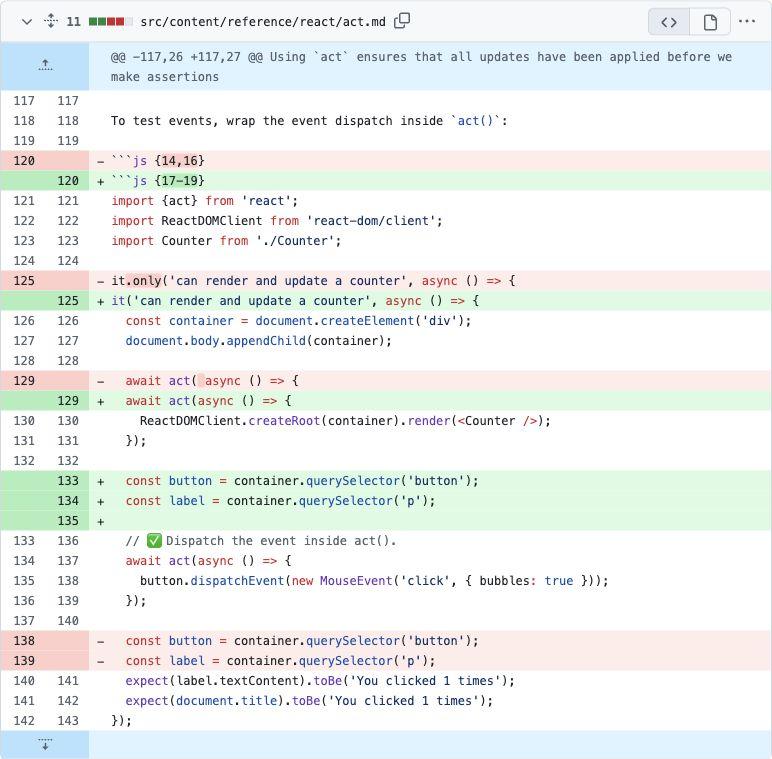
GitHub shows the proposed edits as a diff. Red lines marked - were removed, and green lines marked + were added. The unchanged lines provide context. Alongside moving the variable declarations, this patch removes it.only and updates the documentation's line highlighting.
Clarifying Behavior and Working Through Review
In PR #8579, smg99 clarified how React handles ref callback cleanup. The documentation still described the older behavior without explaining when React calls a returned cleanup function instead.
Here is the PR's patch for src/content/reference/react-dom/components/common.md, including the surrounding text:
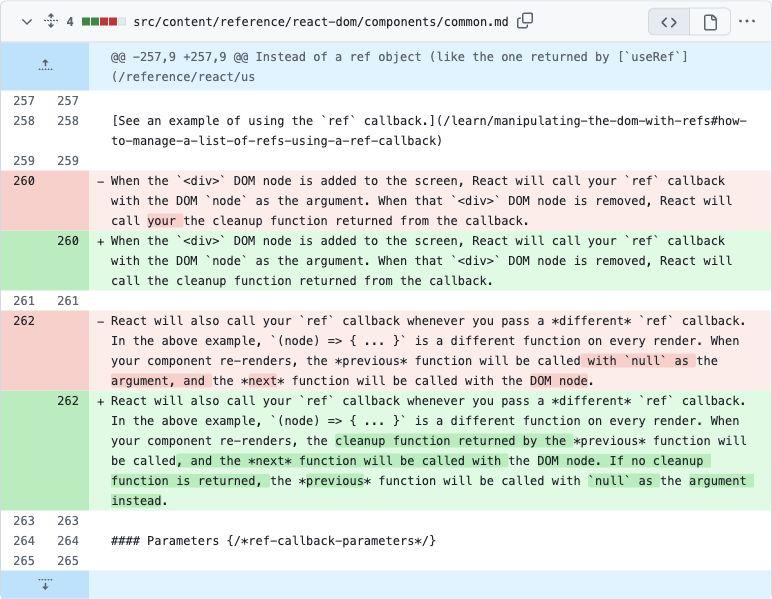
During review, I asked to preserve the surrounding wording while making that correction. smg99 updated the PR, and I reviewed it again before approving and merging it. Review can involve revising an explanation together, even when everyone agrees on the behavior it needs to describe.
Checking Documentation Against the Implementation
In PR #8720, hsusul found that the prerenderToNodeStream() documentation described a callback argument as a Headers instance. Testing the API showed that it was a plain object. Code following the old description could fail.
The correction in src/content/reference/react-dom/static/prerenderToNodeStream.md was small once the behavior had been established:
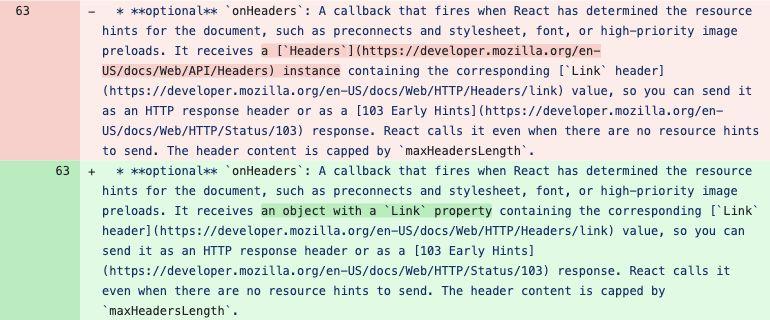
The PR description compares the related APIs and includes a reproduction. That gives reviewers a way to check the finding themselves, which is useful when the change depends on behavior that the documentation currently describes incorrectly.
Working Through a Larger Documentation Gap
After React 19 was released, the form documentation still needed more detail on preserving values after submission. Form Actions reset uncontrolled fields when they finish without throwing, including when they return a validation error. Developers needed guidance on keeping what the user typed when asking them to correct it.
There was already an issue and an earlier documentation PR about this. Maxwell Cohen (Bluesky) took on the broader update in PR #8512. I reviewed the PR together with Sam Selikoff, and we worked through questions about the behavior and revised the explanations and examples together.
The update added several explanations and worked examples:
- Preserving values after saving, using state as the fields' new defaults before React resets them.
- Showing validation errors without clearing the input, by returning submitted values alongside the error.
- Handling multiple submission types, with a revised example that keeps the text after Save draft and clears it after Publish. The PR was opened in June and merged in November. We weren't always quick to respond, but he kept addressing feedback and pushing us to get this improvement merged. I'm grateful to the contributors who investigated these problems and kept working through the reviews with us. Their different experiences helped us find gaps in the documentation and improve it.
Making Your First Pull Request
Let's say we encounter a problem in a project we use and want to help fix it. We can start by searching its issues and PRs. If someone has a proposed fix, testing it or helping address feedback can move that work forward. An agent can help find related discussions, trace the relevant code, or prepare a reproduction.
Agents can also produce patches and open PRs before we've properly considered the change. Before submitting one, we should be able to explain the problem, why the proposed fix belongs in the project, and how we've verified it. If we can reproduce a problem but aren't sure how to fix it, an issue may be a better starting point. For a broader change, discussing the approach first can help avoid unnecessary work. The project's contribution guide may also have rules about AI-assisted contributions.
Once we have a change to propose, we can prepare a PR. We'll use react.dev's contribution guide and setup commands as an example. Other projects have their own requirements, and we can do much of the Git work through an editor or Git client as well as the terminal.
Create a Fork and a Branch
A fork is a copy of a repository under our GitHub account. It lets us make changes without write access to the original project. We can create one using Fork on the react.dev repository. GitHub's forking guide covers the steps.
Cloning downloads the repository to our computer. A branch keeps our proposed change separate from the repository's main branch. For react.dev, we'll need Git, Node.js, and Yarn Classic, with Git configured as described in GitHub's setup guide. We can clone the fork and create a branch in the terminal like this, replacing YOUR_USERNAME with our GitHub username:
git clone https://github.com/YOUR_USERNAME/react.dev.git
cd react.dev
git switch -c docs/fix-example
Because we cloned the fork, Git's origin remote points to our own copy. We'll push our changes there when we're ready to propose them to the original project.
Edit and Check the Change
Now we can open the project in an editor and find the files related to the problem. In react.dev, documentation and embedded examples live in Markdown files under src/content.
The project's setup instructions explain how to install dependencies and run it locally. In react.dev, we can start the documentation site with:
yarn install
yarn dev
The site runs at http://localhost:3000, where we can check the edited page. Many react.dev pages include interactive Sandpack examples. If we change one, we should run it and try the behavior the explanation describes, including any error cases affected by our edit. A page rendering successfully doesn't tell us whether its example works.
We should also run the project's checks relevant to our change. In react.dev, yarn ci-check covers formatting, linting, types, and documentation validation. If we're using the same terminal, we can stop the development server with Ctrl+C and run:
yarn ci-check
Before committing, we can review the diff in our editor, Git client, or AI tool to check that it contains the files and changes we intended. I normally use VS Code's diff viewer to look through the changed files. This is especially useful after an agent has edited the project. We can also use git diff in the terminal.
Commit, Push, and Open the PR
A commit records our change in Git. A push uploads the commit to our fork. Editors and Git clients usually have controls for both. In the terminal, a documentation change could look like this, with the file path and commit message adjusted to match our work:
git add src/content/reference/react/act.md
git commit -m "Fix event-testing example"
git push -u origin docs/fix-example
After pushing the branch, we can open a PR. The base is the branch we want to contribute to, and the compare branch contains our change. In this example, we're proposing to merge docs/fix-example from our fork into main in reactjs/react.dev.
I normally open the PR as a draft, then review the complete diff again in GitHub's Files changed tab. That lets me check what reviewers will see across all the commits before marking it ready for review.
Write the Title and Description
The title and description help a reviewer understand why we're proposing the change. The project's contribution guide and PR template may ask for particular information, such as reproduction steps, related issues, or test results. For react.dev, the guide also covers writing style, code examples, and line highlighting. Its PR template asks for the issue number when a change relates to an existing issue.
We can give the PR a title that names the correction, then explain what we tried, what happened, what we found, and how we checked the fix. Even if an agent helped investigate or edit the files, the description should give our own account of the work so we can discuss it with the reviewer.
For a change like the test correction, the description could look like this, with the validation section reflecting the checks we actually performed:
Title: Fix variable ordering in the act() event-testing example

## Summary

I tried the "Dispatching events in tests" example in
src/content/reference/react/act.md and found that it fails before
reaching the assertions.

The example calls `button.dispatchEvent()` before the `const button`
declaration. This throws a `ReferenceError`, so the example can't
demonstrate the event-testing behavior it's explaining.

## Reproduction

1. Open https://react.dev/reference/react/act#dispatching-events-in-tests.
2. Run the test with the `Counter` component used on that page.
3. The test throws when it tries to access `button` before its declaration.

## Changes

- Move the `button` and `label` lookups above the event-dispatch `act()` call.
- Remove `it.only` so copying the example doesn't skip the other tests.
- Update the highlighted line numbers to match the moved code.

## Validation

- [x] Ran the original example and reproduced the `ReferenceError`.
- [x] Ran the corrected test and checked that its assertions pass.
- [x] Opened the page locally and checked the highlighted lines.
- [x] Ran `yarn ci-check`.

## Related work

https://github.com/reactjs/react.dev/pull/8142 touches the same example
to update its async style. This change addresses the variable ordering.
Depending on the change, a before-and-after screenshot from a local run, error output, or a short recording can make the problem and correction easier to review. We can include whichever helps explain our findings.
Respond to Review
Once the PR is ready for review, a maintainer might suggest another approach, ask about related behavior, or request a wording change, as I did on the ref callback PR. We can make the update, check it again, and push another commit to the same branch. That updates the existing PR. A reply explaining what changed helps the reviewer pick it up again. If a request is unclear, we can ask about it before editing.
Maintainers often have full-time jobs alongside their open source work, so they may not respond quickly. If a PR has been waiting, a short follow-up can explain its current state, what we've checked since the last review, and whether we need help. Testing another contributor's work or helping answer a review question can also help a project get useful changes merged.
Conclusion
A useful contribution starts with a problem we understand and gives someone else enough context to review the improvement. That can be a reproducible issue, a tested change, or help getting an existing PR finished. AI can help with the investigation, editing, and review, while we remain responsible for checking and explaining our work. When maintainers help contributors through review, the project gets the improvement and people have support to keep contributing.
Sources:
More certificates.dev articles
Get the latest news and updates on developer certifications. Content is updated regularly, so please make sure to bookmark this page or sign up to get the latest content directly in your inbox.
Coordinating Optimistic Updates in React
Learn how to combine React’s useActionState, useOptimistic, and useTransition to implement ordered, optimistic UI updates for a channel‑sidebar layout, handling saves, rollbacks, and seamless user interaction.
Aurora Scharff
How to Make a Useful Open Source Contribution
Learn how to make useful open source contributions by identifying reproducible problems, testing and documenting fixes, preparing clear pull requests, and working constructively with maintainers through review.
Aurora Scharff
What Is a CLI I, and What It Means to Build One
Learn what CLIs are, how common tools support a Vue workflow, and how to build a Node.js CLI that reads input, generates files, and runs as a command.

Reza Baar