Angular Signal Forms — Set-up and validation rules
The article explains Angular’s experimental Signal Forms (introduced with Angular 21), showing how they provide a third approach to building forms alongside template-driven and reactive forms by using signals to manage form data, state, and validation more directly and intuitively, including centralized, reusable validation rules and simpler access to field status like validity, errors, and user interaction.

Alain Chautard
February 11, 2026
Signal Forms are available with Angular 21 as an experiment, which means the API described in this tutorial is subject to change, but stable enough to give you a first overview of Angular Signal Forms.
Rather than replacing template-driven forms or reactive forms, signal forms are a third option. In this brief tutorial, I will highlight how the new paradigm works and what the differences are compared to previous approaches.
Creating a signal form
Signal forms are driven by signals, and signals are driven by data. This means that to create a signal form, we start by describing the data we want our form to manage:
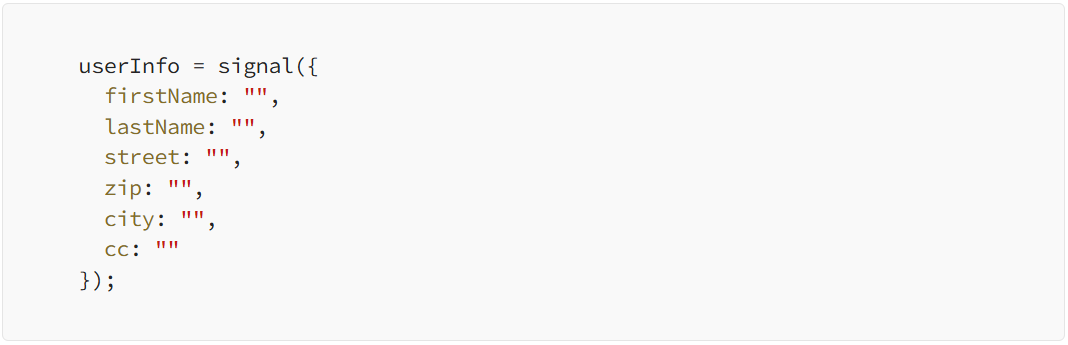
Then, we tell Angular that we want to manage that data using a form:

Note that all signal form features come from the same module @angular/forms/signals, which means all TypeScript imports look like this:

The last step is to connect our form to an HTML template using the Field directive as follows:
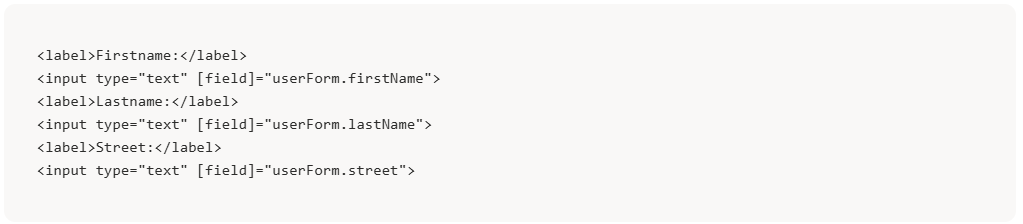
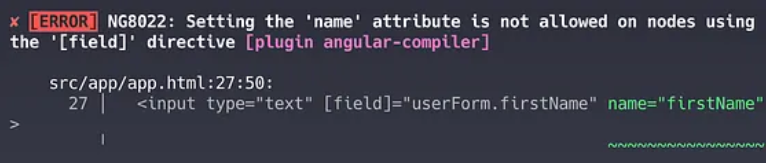
And that’s it! You don’t need to add a name attribute, as was the case with template-driven forms. Angular forms will add that name for you. Not only that, if you do add a name attribute, the compiler will tell you not to do that:
And now we have a signal form. What this means is that userForm exposes an API similar to what we’re used to with reactive forms, albeit in a funny manner. Here’s what I mean by that:
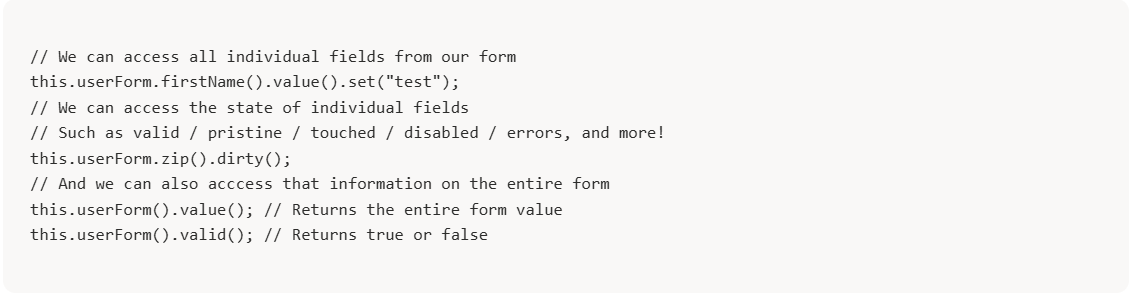
That’s because this.userForm returns a FieldTree object, whereas this.userForm() returns a FieldState object. The difference is subtle, but the FieldTree allows us to navigate within our form hierarchy to find what we need, and the FieldState returns signals of the field information.
Now, the good news is that everything you could ever dream of is available in those objects, which means displaying feedback to the user looks like this:

Adding some form validation
When creating our form, remember that we call the form function like so:

Now, if we want to add some validation rules, we pass a second argument to that function, which is a function where we can add validation rules as follows:

In the above, firstName is required, zip must be a 5-digit number (regular expression validation), and the credit card number (cc) must have a maximum of 16 digits. Any user input that breaks these rules would update the state of the valid() and errors() signals of the related fields.
What’s nice about that approach is that validation rules can be stored in a central location and reused in various forms.
For instance, I can create a creditCardValidation function like so:

And then use it in my form like so:

So that’s really cool to refactor and reuse validation rules. To be fair, this was doable with reactive and template-driven forms, but perhaps not as easily.
Overall, signal forms are promising. Some features seem to be missing (no more CSS ng- classes applied to form elements) for now, but the setup and API access look easier and more intuitive than before.
We’ll see how that experiment evolves over time, and I’ll cover these updates on the blog. Stay tuned!
More certificates.dev articles
Get the latest news and updates on developer certifications. Content is updated regularly, so please make sure to bookmark this page or sign up to get the latest content directly in your inbox.

Iterator Helpers: Lazy Pipelines in JavaScript
ES2025 added map, filter, take and drop to iterators. Learn how lazy pipelines skip intermediate arrays, handle infinite sequences, and where they do not help.

Martin Ferret
Oct 6, 2026

Debugging Suspense with the React Suspense Panel
The Suspense panel in React Developer Tools shows which boundary suspended, what it was waiting for, and the order your page revealed its content.

Aurora Scharff
Oct 1, 2026

Building Reusable Validators in Angular Signal Forms
Learn how to create reusable custom validators with Angular Signal Forms, with practical examples for building flexible and maintainable form validation.
Alain Chautard
Sep 29, 2026